Article
Broadcast Video on Chat Roulette | How To
March 17, 2010 Updated February 19, 2017 1 min read J

Sometimes when you're browsing through chatroulette you notice some of your partner's camera feeds are of recorded video or picture. You can do this too on your mac using Camtwist and Soundflower.
Setting up the video and audio channels
Camtwist can be found here and Soundflower here. Install and launch both applications. Soundflower should populate up on your global toolbar as a small flower icon like so.Thats all we need to do with Soundflower.
Go over to camtwist and under the step 1 heading, click on Movie to select it (1) then press the select button(2). Find the movie that you want to broadcast in your finder and drag it into your playlist(3). Finally click the play button to play it (4), at this point you will only hear sound.
[caption id="attachment_557" align="aligncenter" width="300" caption="Click to Enlarge"] [/caption]
Thats all we need to do with Soundflower.
Go over to camtwist and under the step 1 heading, click on Movie to select it (1) then press the select button(2). Find the movie that you want to broadcast in your finder and drag it into your playlist(3). Finally click the play button to play it (4), at this point you will only hear sound.
[caption id="attachment_557" align="aligncenter" width="300" caption="Click to Enlarge"]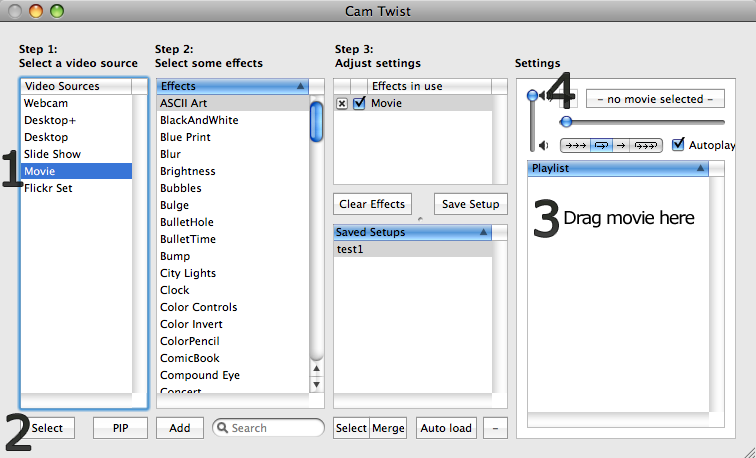 [/caption]
Press cmd+, to go to preferences and click on "General". In the drop-down menu for the audio output device select "Soundflower(16ch)".
Setting Up Chatroulette
 Visit the chatroulette website and, once the website has loaded up, move your cursor over your (bottom) cam window and a few options should pop up. For cam, select "CamTwist" and for Mic select "Soundflower(16ch)" and press allow on any flash security prompts. A CamTwist screen should appear on your (bottom) cam window. Click the Start button and you are now broadcasting your movie or image to the other chatrouletter.
If you don't see the CamTwist Icon appear on your cam window, try restarting the browser and configuring the chatroulette Cam and Mic options again.